

Dashboards as Code for your dbt Project

dbt is great for transforming data. You write modular SQL, track everything in Git, and run automated tests to make sure your data is correct.
But dbt doesn’t help you visualize your data.
When it’s time to build dashboards on top of a dbt project, you usually end up clicking around in a separate BI tool - outside of Git and disconnected from your code workflow.
That’s where Shaper comes in: In Shaper, dashboards are also just SQL files stored in Git.
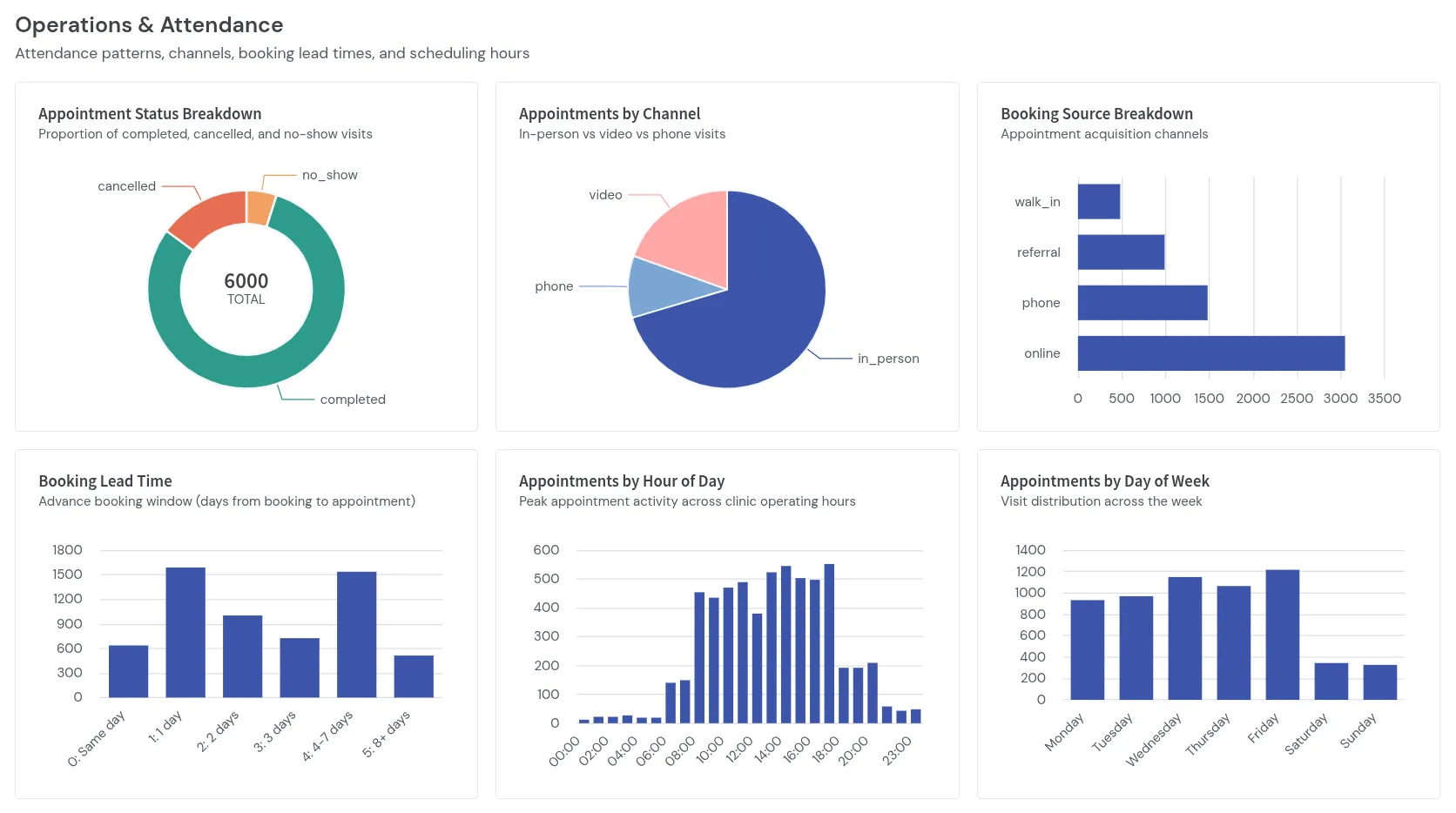
Recently, Jarich (creator of model2data) and I built a demo project to show how simple it is to go from a data model to a tested dbt project and an interactive Shaper dashboard.
We auto-generated the dbt project with model2data then, generated the Shaper dashboard with a single AI prompt.
You can check out the live dashboard and the code right here:
Generating the dbt Project and Test Data
Section titled “Generating the dbt Project and Test Data”When building a demo, fake data is usually a pain. If you just generate random values, all your charts look flat and unrealistic. Or the data doesn’t even make sense - like invoices dated before an appointment was booked, or payments on cancelled visits.
That’s the problem Jarich solved with model2data.
For our demo, we modeled a network of 8 healthcare clinics with practitioners, treatments, insurers, patients, and appointments in a single schema file.
With model2data, you define your schema once and specify how the generated data should behave:
# Excerpt from healthcare_clinics.model2data.ymlappointments: role: fact columns: status: type: appointment_status not_null: true generate: weights: {completed: 16, cancelled: 3, no_show: 1} booked_at: type: timestamp not_null: true generate: {growth: 0.5} scheduled_for: type: timestamp not_null: true generate: {after: booked_at, business_hours: true} actual_duration_minutes: type: int generate: min: 10 max: 120 when: {status: [completed]} distribution: {kind: normal, mean: 35, stddev: 12} billed_amount: type: numeric generate: min: 25 max: 600 when: {status: [completed]} distribution: {kind: lognormal, median: 95, spread: 0.5} paid_at: type: timestamp generate: after: checked_in_at when: {status: [completed]} null_rate: 0.3From this single file, model2data generates:
- A DuckDB database with 1,500 patients and 6,000 appointments scheduled during realistic weekday business hours.
- A complete dbt project with staging models and 83 automated dbt data tests - checking primary keys, foreign key relationships, non-null constraints, and valid status values.
Dashboards as Code for dbt
Section titled “Dashboards as Code for dbt”Once you have a ready dbt project, building dashboards in Shaper follows the exact same workflow. Shaper directly connects to the database generated by model2data and queries the exact tables dbt defined.
Shaper is directly built on top of DuckDB and lets you build interactive dashboards completely in SQL:
- Dashboards live as
.dashboard.sqlfiles right next to your dbt models in Git. - You use standard DuckDB SQL and turn results into filters, metrics, and charts using custom SQL types like
::DROPDOWN,::BARCHART_STACKED, or::LINECHART. - Because dbt already tests your foreign keys and constraints, you can join tables and calculate metrics without worrying about broken references or messy data.
Here is how Clinic Overview.dashboard.sql sets up filters at the top and caches the filtered dbt tables in a temporary table for fast queries across the dashboard:
-- 1. Main Header & ControlsSELECT 'Healthcare Clinic Network'::SECTION, 'Executive Overview & Clinical Operations'::SUBTITLE;
SELECT  min(scheduled_for)::DATE::DATEPICKER_FROM AS start_date,  max(scheduled_for)::DATE::DATEPICKER_TO AS end_dateFROM staging.stg_appointments;
SELECT 'Clinic'::LABEL;SELECT 'All Clinics'::DROPDOWN AS selected_clinicUNION ALL(SELECT name FROM staging.stg_clinics ORDER BY name);
-- 2. Cache filtered dataset in memoryCREATE TEMP TABLE filtered_appointments AS (  SELECT    a.id AS appointment_id,    a.status,    a.channel,    a.booking_source,    a.scheduled_for,    a.actual_duration_minutes,    a.billed_amount,    a.paid_at,    c.name AS clinic_name,    p.specialty AS practitioner_specialty,    t.name AS treatment_name,    COALESCE(i.name, 'Uninsured / Self-Pay') AS insurer_name  FROM staging.stg_appointments a  JOIN staging.stg_practitioners p ON a.practitioner_id = p.id  JOIN staging.stg_clinics c ON p.clinic_id = c.id  JOIN staging.stg_treatments t ON a.treatment_id = t.id  JOIN staging.stg_patients pat ON a.patient_id = pat.id  LEFT JOIN staging.stg_insurers i ON pat.insurer_id = i.id  WHERE a.scheduled_for::DATE BETWEEN getvariable('start_date') AND getvariable('end_date')    AND (getvariable('selected_clinic') = 'All Clinics' OR c.name = getvariable('selected_clinic')));
From there, every chart on the dashboard is just a simple SQL query:
SELECT 'Monthly Appointments by Status'::LABEL;SELECT date_trunc('month', scheduled_for)::DATE::XAXIS, status::CATEGORY, count(*)::BARCHART_STACKEDFROM filtered_appointmentsGROUP BY ALLORDER BY ALL;Generating the Dashboard in a Single Prompt
Section titled “Generating the Dashboard in a Single Prompt”What’s not in the repo is how I created the dashboard.
I didn’t write those 300 lines of SQL by hand.
Instead, I used the Shaper AI Skills. The skills teach your AI coding agent (like Claude Code, Cursor, or Codex) how to inspect the database schema, write Shaper SQL, validate queries, and preview dashboards via the Shaper CLI.
With Shaper connected to the DuckDB database from the dbt project, I gave the agent a single prompt:
I got this DBT project. Shaper is connected to the database from this project. Please generate me an overview dashboard for the data in this project. ask me for suggestions of what to show as different sections.
- The agent then read the dbt project and ran
shaper schemato inspect the tables and columns in DuckDB. - It suggested 6 sections for the dashboard and I didn’t have to adjust anything. I just replied “ok”.
- The agent generated
Clinic Overview.dashboard.sql, ranshaper validatein the terminal to verify that all SQL queries run without errors, and opened the live dashboard in my browser usingshaper preview.
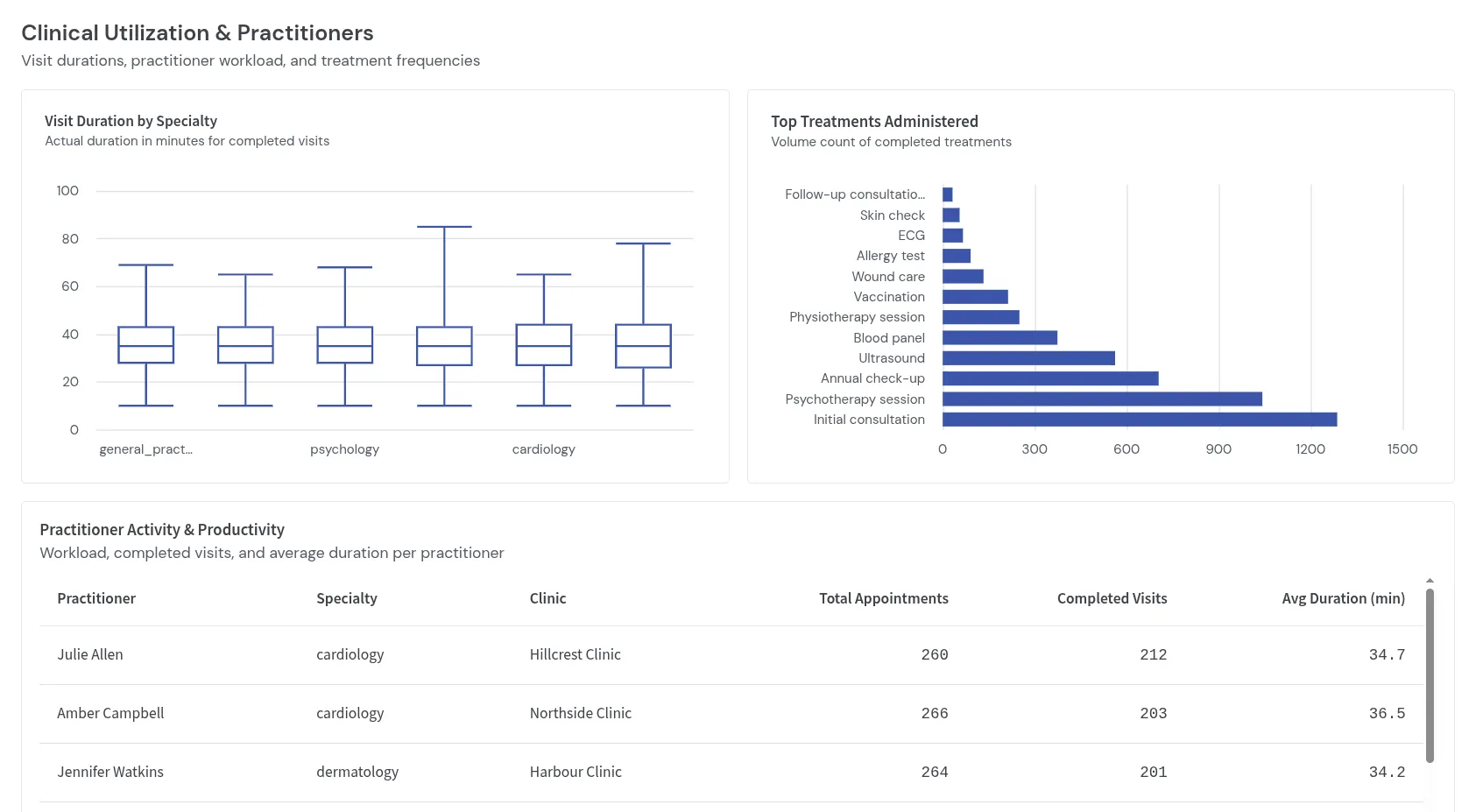
Because dbt projects are well-structured and Shaper dashboards are just SQL validated via the CLI, the AI agent created a working dashboards without me having to fix anything.
And since shaper schema and shaper validate only check the schema and SQL syntax locally, the LLM never even sees your actual data.
Try It Yourself
Section titled “Try It Yourself”If you want to try the demo locally, all you need is the Shaper CLI:
- Clone the demo repository:
Terminal window git clone https://github.com/taleshape-com/model2data-shaper-demo.gitcd model2data-shaper-demo - Start Shaper with the included DuckDB file and deploy the dashboard:
Terminal window shaper -d .shaperdata --duckdb healthcare_clinics.duckdb --deploy . - Open http://localhost:5454/dashboards/clinic-overview in your browser.
To use the AI workflow on your own dbt project, check out the AI Agent Workflow docs. And if you need realistic test data and dbt models from a simple schema definition, definitely check out Jarich’s model2data.